
Why I Built AI Dashboard Apps
- Rick Pollick

- Jul 8
- 6 min read
Why I Built ProjectInsights AI and KPTDashboard: Universal Analytics and Radical Visibility in Action
If you’ve worked with me, you know I’m borderline obsessed with two things: radical visibility and intelligent automation. I thrive on building solutions that not only make life easier for teams but also expose hidden truths buried in their data.
Two apps I built recently – ProjectInsights AI and Customer Support Trend Dashboard – embody this philosophy and my approach to product, analytics, and delivery leadership.
ProjectInsights AI: Universal Project Analytics
The Problem It Solves
Every project manager, program lead, or delivery manager has faced the nightmare of juggling multiple project management tools. Each has its own data structures, metrics, and reporting quirks. You want a single, trustworthy view to analyze team velocity, delivery risk, estimation quality, and burndown trends, but instead, you spend hours manually exporting, cleaning, transforming, and re-importing data across tools like Jira, Azure DevOps, or Linear.
This challenge is widespread because modern organizations often lack a unified delivery platform. According to Rigby, Sutherland, and Takeuchi (2016), agile at scale involves coordination across teams with varying tools, leading to fragmented visibility. That fragmentation delays decisions and makes risk identification reactive rather than proactive.
Why I Built It
I built ProjectInsights AI to end that pain. The vision was simple: create universal project analytics that could ingest data from any tool, map it intelligently, and provide actionable insights instantly, without requiring specialized data engineers or hours of manual ETL work. This aligns with Westerman, Bonnet, and McAfee’s (2014) emphasis on digital leaders building data platforms that transcend individual systems to enable strategic decision-making.
How It Works
The platform works by allowing users to upload JSON exports from their project management tools. Unlike static BI dashboards that require pre-defined schemas, ProjectInsights AI uses AI-powered data mapping to transform diverse input structures into a standardized internal schema automatically. This AI mapping capability draws on modern AI reasoning and knowledge representation techniques, as outlined by Russell and Norvig (2020), enabling it to identify semantically equivalent fields across different tools (for example, mapping “StoryPoints” in Jira to “Effort” in Azure DevOps).
If the uploaded data structure differs from expectations, the AI re-maps fields intelligently with minimal user intervention. Users can also explore the platform with demo data before uploading their own files, supporting onboarding and learning without risk.
The Analytics Dashboard
The comprehensive dashboard includes several integrated features:

AI Assistant (“Art Vandelay”): An OpenAI-powered assistant that answers natural language queries about your projects. For example, you can ask “Which teams are under velocity targets this sprint?” and receive immediate structured answers, reducing the need to navigate multiple views manually.

Target Delivery Likelihood Analysis: Combines statistical models with AI algorithms to estimate the probability of meeting delivery targets. This feature implements traditional probability theory blended with pattern recognition models to forecast based on historical velocity, work remaining, and team performance variability, reflecting practices described in Provost and Fawcett’s (2013) work on predictive analytics for business decisions.

Overview Section: Displays key performance indicators such as completion percentages,
average team velocity, sprint burndown performance, and cumulative flow statistics.

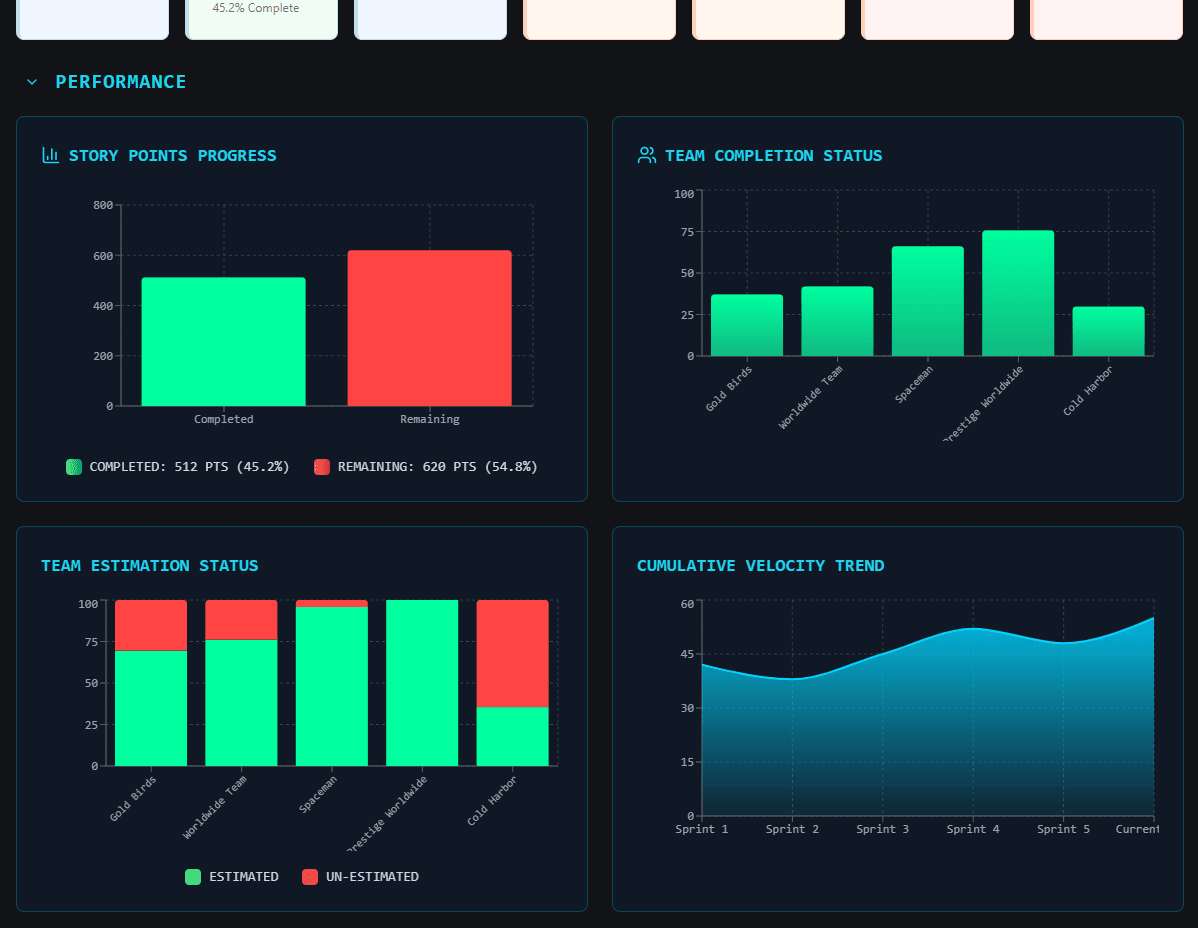
Performance Section: Visualizes team throughput over time and compares estimation accuracy across teams and sprints.

Risk Assessment: Highlights areas with high scope churn, estimation gaps, delivery delays, or unusual team performance patterns, enabling proactive intervention before issues escalate into delivery failures.
Security and Privacy
Security and privacy were non-negotiable in the design. Data governance is critical in professional environments, and ProjectInsights AI ensures:
User authentication with Supabase for secure access, leveraging PostgreSQL with row-level security to enforce strict data isolation.
No permanent data storage – all project data is processed in memory only, aligning with recommendations in McKinsey’s (2023) Data Strategy for Competitive Advantage, which highlights minimizing data retention to reduce security risk.
Users can delete accounts and update credentials anytime, ensuring compliance with GDPR and internal IT policies.
Technical Architecture
Here’s what’s under the hood:
Frontend:
React 18 with TypeScript for robust type safety, maintainability, and improved developer experience.
Vite for blazing-fast development and build cycles.
Tailwind CSS combined with shadcn/ui for modern, clean, and responsive user interfaces.
Recharts for interactive, performant data visualizations.
Backend & Infrastructure:
Supabase for authentication, database services, and serverless edge functions.
OpenAI integration powers:
Intelligent data mapping that standardizes JSON inputs regardless of source structure.
The Art Vandelay AI assistant for natural language queries and recommendations.
Data Processing:
JSON uploads and schema validation.
Real-time transformation and mapping into internal data structures.
Statistical calculations for project metrics such as velocity averages, estimation accuracy, cumulative completion rates.
Likelihood analysis using ensemble algorithms combining linear regressions, historical averages, and pattern-based forecasting models to generate robust predictions.
Deployment:
Deployed on a platform with CI/CD from code pushes, integrated backend services, and custom domain support for enterprise use cases.
Why It Matters
ProjectInsights AI empowers teams to:
Gain instant, standardized insights across tools without expensive custom integrations or manual ETL.
Forecast delivery risks using combined statistical and AI-driven likelihood models rather than gut feelings or single-point metrics.
Identify inefficiencies and estimation gaps to improve planning accuracy, confidence, and stakeholder trust.
In a world where hybrid project management stacks are the norm, universal analytics tools like ProjectInsights AI are crucial for enabling radical transparency, faster decision-making, and data-driven delivery optimization (Westerman et al., 2014).
Customer Support Ticket Trend Dashboard
The Problem It Solves
While ProjectInsights AI tackles universal project data challenges, the Customer Support Ticket Trend Dashboard addresses a very specific operational pain point: tracking customer support tickets. In my professional environment, we manage tickets across Aha! and Azure DevOps, and customer stakeholders often need a unified, clear view of their issues. Before the dashboard, the workflow was fragmented and inefficient:
Teams downloaded separate reports from each system.
Data had to be manually cleaned, merged, and reformatted in Excel.
Static reports were shared, quickly becoming outdated as new tickets were filed or statuses changed.
This manual workflow cost hours weekly and created confusion about ticket status, ownership, and prioritization, delaying customer support responses and eroding stakeholder trust.
Why I Built It
Customer Support Ticket Trend Dashboard was built to centralize this process into an instant, interactive analytics dashboard specifically for customer tickets. It gives customer managers and support teams confidence that they are seeing the latest data organized intuitively, without requiring specialized technical skills to combine and interpret multiple files.
How It Works
Users begin by downloading CSV ticket data files from a shared location, containing ticket data from both Aha! and Azure DevOps. These files are then uploaded into the dashboard.
All data processing happens entirely locally in the browser. This architecture ensures:
Zero external transmission of sensitive data, complying with HIPAA requirements for protected health information security (HIPAA Journal, 2022).
Near-instant processing speeds without relying on backend APIs or cloud functions.
Once uploaded, the app:
Parses CSV files with robust libraries that handle complex data structures, embedded quotes, and inconsistent delimiters common in exported CSVs.
Groups tickets by customer, displaying:
Total ticket counts per customer.
Status breakdowns, such as open, closed, or in progress, for quick health checks.
Type breakdowns, such as bug reports, feature requests, and tasks, to support prioritization strategies.
Each customer card in the dashboard is clickable, opening a detailed modal for that customer with a full table of ticket details, enabling drill-down analysis and targeted follow-ups.
Technical Architecture
Frontend Stack:
React with TypeScript for scalable, maintainable components.
Vite for optimized build performance and rapid development cycles.
Tailwind CSS + shadcn/ui components for consistent design language and responsive layouts.
Data Handling:
Client-side CSV parsing with advanced handling for complex files.
No backend – everything processes locally in the browser to maintain strict data privacy and security.
Why It Matters
KPTDashboard delivers tangible operational benefits:
Faster support analysis by surfacing customer ticket statuses instantly.
Privacy-first design, ensuring no sensitive ticket or customer data is transmitted externally or stored long-term.
Efficiency gains that replace hours of manual Excel manipulation with an intuitive, interactive dashboard providing immediate, reliable insights.
Connecting Back to My Professional Themes

Both of these apps embody what I believe is critical in today’s product and delivery landscape:
Process-As-Product/Radical Visibility: Making insights accessible instantly across tools or domains to foster trust, alignment, and informed decision-making (Denning, 2018).
Data-Driven Decision Making: Leveraging AI and analytics to reduce manual analysis, improve accuracy, and minimize decision biases (Provost & Fawcett, 2013).
Automation with Privacy: Designing solutions that simplify workflows while maintaining strict compliance and security standards.
Technical Elegance: Using modern, clean stacks to build scalable, maintainable, and user-friendly tools that teams actually enjoy using.
In a time where teams are drowning in fragmented data and manual workflows, solutions like ProjectInsights AI and Customer Support Ticket Trend Dashboard are lifelines. They empower organizations to see what’s really happening, make smarter decisions faster, and deliver better outcomes for their customers.
If you’re interested in these solutions, or want to discuss how AI and data-driven tools can transform your product or project delivery practices, let’s connect.
References
Denning, S. (2018). The Age of Agile. AMACOM. HIPAA Journal. (2022). HIPAA Compliance and Web Applications.
McKinsey & Company. (2023). Data Strategy for Competitive Advantage.
Provost, F., & Fawcett, T. (2013). Data Science for Business. O’Reilly Media.
Rigby, D. K., Sutherland, J., & Takeuchi, H. (2016). Embracing Agile. Harvard Business Review, 94(5).
Russell, S., & Norvig, P. (2020). Artificial Intelligence: A Modern Approach (4th ed.). Pearson.
Westerman, G., Bonnet, D., & McAfee, A. (2014). Leading Digital: Turning Technology into Business Transformation. Harvard Business Review Press.


